How to set up Facebook inventory ads for a used car lot
Meta's automotive inventory ads turn your whole stock list into ads that update themselves. Here is how an independent lot sets them up, from the vehicle feed to the pixel to the first campaign.
SocialPulse Hub team · Updated 31 Oct 2026 · 13 min read
Key takeaways
- Inventory ads are built from a vehicle catalogue, so every car on your lot becomes an ad that updates when stock changes.
- You need a daily vehicle feed, a vehicles-type catalogue in Commerce Manager and a pixel whose IDs match the catalogue.
- Start with two campaigns: local prospecting with a broad radius, and retargeting people who viewed a car.
- Finance messaging brings extra rules: Meta's special ad category in the US and FCA promotion rules in the UK.
If you run an independent used car lot, you have probably boosted a few posts on Facebook, watched the likes come in and then waited for the phone to ring. Facebook inventory ads work differently. Instead of one photo of one car, they take your whole stock list and show each shopper the vehicles they are most likely to want, with the price, mileage and photos pulled straight from your listings.
Meta calls this format Automotive Inventory Ads. You will also see it called Facebook automotive inventory ads, Facebook car ads, dynamic ads for auto or vehicle catalogue ads. Franchise groups have used it for years with big agency support. This guide is for the rest of the market: lots with somewhere between 20 and 200 cars, a small team, and stock that changes every week.
This automotive inventory ads setup guide covers what you need before you start, how to build the vehicle catalogue, how to set up the pixel so the ads know which cars people looked at, how to structure the campaign, and the mistakes that quietly waste budget.
What Facebook inventory ads for car dealers actually do
A normal Facebook ad is a fixed creative. You pick a photo, write the text and it runs until you change it. When the car sells, the ad keeps running unless someone remembers to switch it off.
Inventory ads are built from a vehicle catalogue, which is a structured list of every car on your lot. Meta reads that list and builds the ads for you. A shopper who looked at mid-size SUVs on your website might see a carousel of the SUVs you have in stock right now. Someone who browsed hatchbacks under a certain price sees those instead.
Three things make this format a good fit for used car dealers:
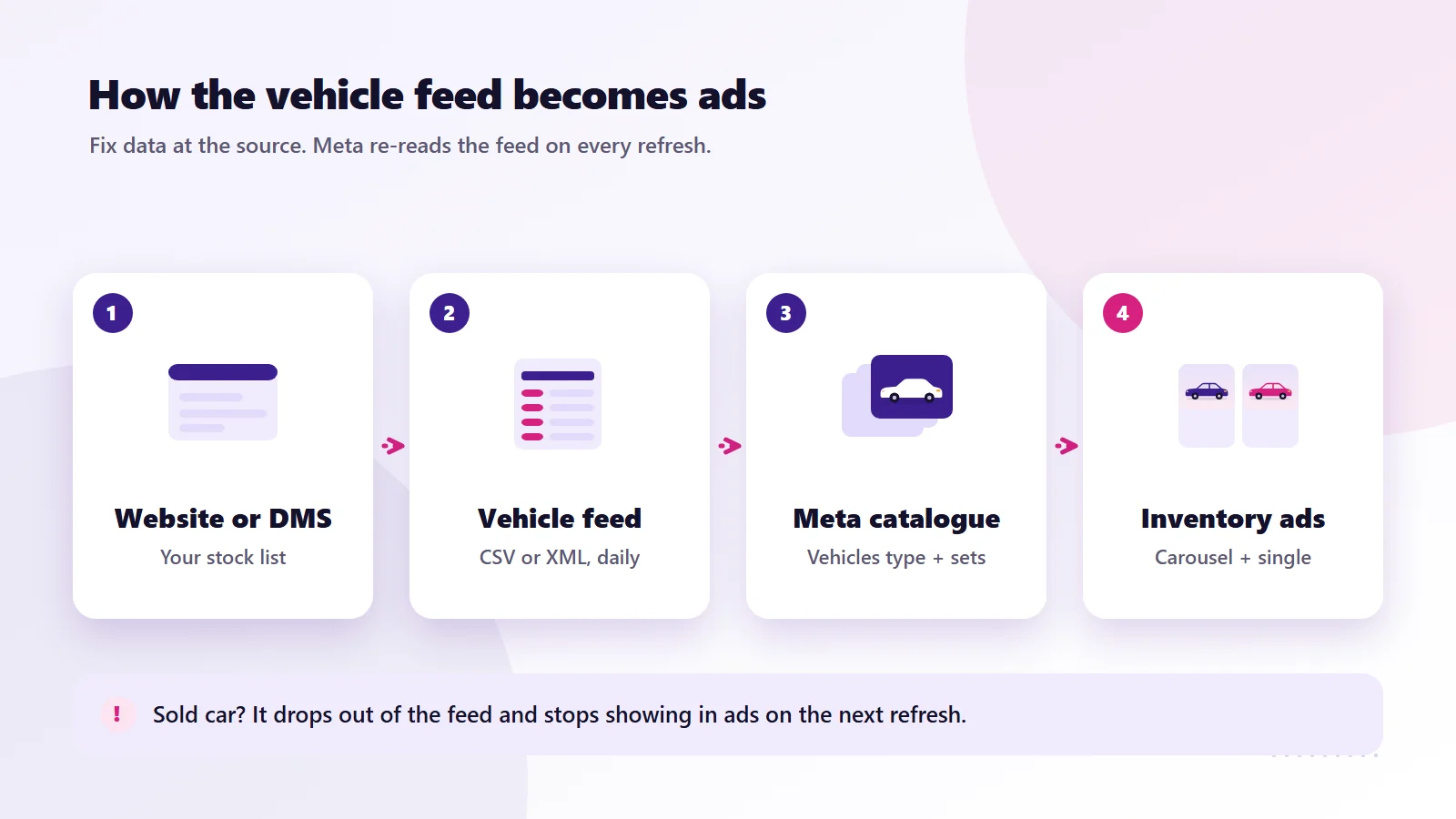
- The ads update with your stock. When a car sells and drops out of the feed, it stops appearing in ads. New arrivals are picked up on the next feed refresh.
- Every car becomes an ad. You do not have to design a separate creative for each vehicle. A lot with 80 cars effectively has 80 ads.
- Meta can match cars to people. Using signals from your website and from Facebook and Instagram, Meta tries to show each person the vehicles they are most likely to be interested in.
Meta automotive inventory ads support new, used and certified pre-owned vehicles, according to Meta's own documentation, so they work for a pure used lot just as well as for a franchise store.
Before you start: the checklist
Most setups stall because one of these is missing. Get them in place first and the rest goes quickly.
| What you need | Why it matters | Who usually has it |
|---|---|---|
| Meta Business Manager (Business Portfolio) | Owns the ad account, catalogue and pixel in one place | You, or whoever set up your Facebook page |
| An ad account with a payment method | Runs the campaign | You |
| A vehicle detail page (VDP) for every car | Each ad needs a page to link to | Your website provider |
| A vehicle feed (CSV, TSV or XML) | This becomes your catalogue | Your website provider or DMS |
| Meta pixel on your website | Tells Meta which cars people viewed | Your website provider or agency |
| Good photos for every car | The first photo is the ad | Your sales or prep team |
If your website shows each car on its own page with a unique URL, you are in good shape. If cars only appear inside a third-party widget with no proper pages, sort that out first, because inventory ads need somewhere sensible to send people.
Step 1: Get a vehicle feed from your website or DMS
The feed is a file that lists every car with its details. Most dealer website platforms and dealer management systems can export one, and many already produce feeds for listing sites. Ask your provider for a Meta vehicles feed, in CSV or XML, refreshed at least once a day, and published at a fixed URL so Meta can fetch it on a schedule.
Meta's vehicle catalogue reference lists the fields it needs. These are the ones that matter for a used car lot:
| Field | What goes in it | Used car tip |
|---|---|---|
| vehicle_id | A unique ID for each car | Use your stock number or VIN. Never reuse an ID |
| title | Year, make, model and trim | "2019 Ford Focus Titanium" reads better than a stock code |
| description | Plain text about the car | No links and no promotional shouting |
| url | The vehicle detail page | Link to that exact car, not your homepage |
| make, model, year | Basic details | Year in yyyy format |
| mileage.value and mileage.unit | Current mileage | Unit is MI or KM. UK and US lots use MI |
| image[0].url | Main photo | Up to 20 images allowed per car |
| body_style | One of Meta's set values | SUV, SEDAN, HATCHBACK, TRUCK, VAN and so on |
| price | Price plus currency code | Written like "18000 USD" or "14995 GBP" |
| exterior_color | Colour | Use plain colour names |
| state_of_vehicle | New, Used or CPO | Most of your stock will be Used |
| Dealer address, latitude, longitude | Where the car is | Needed so Meta can show cars to nearby buyers |
Optional fields such as trim, transmission, fuel type, drivetrain, sale price and an availability flag are worth adding. Availability lets you mark a car as not available without deleting it, and Meta will stop showing it.
Step 2: Build your Facebook vehicle catalog in Commerce Manager
In Meta Commerce Manager, create a new catalogue and choose the vehicles type rather than the standard ecommerce products type. This matters. Meta's catalogue setup guide is clear that the automotive catalogue uses a different set of fields from a normal product catalogue, so an ecommerce catalogue will not work for inventory ads.
Then add your data source:
- Choose a scheduled feed and paste in the feed URL from your provider.
- Set the refresh to daily, or more often if your provider supports it.
- Run the first upload and open the issues report.
The first upload almost always throws a few errors. The common ones on used car feeds are missing images, mileage sent without a unit, prices without a currency code, and body styles that do not match Meta's list. Fix them at the source, in your website or DMS export, rather than editing items inside Meta. Otherwise the next refresh will overwrite your fixes.
Build vehicle sets
A vehicle set is a filtered slice of your catalogue. You might create sets for:
- All available used stock
- SUVs and 4x4s
- Cars under a set price
- Vehicles that have been on the lot for more than 45 days
Sets let you run different campaigns or budgets for different parts of the lot. The aged stock set is especially useful, because those are the cars costing you money every day they sit there.
Step 3: Set up the pixel so the ads know which cars people viewed
The catalogue tells Meta what you have. The pixel tells Meta what each shopper looked at. Without it, inventory ads lose most of their power because Meta cannot connect a person to a specific car.
Meta's automotive events guide asks for three standard events on your website:
| Event | Where it fires | Key detail |
|---|---|---|
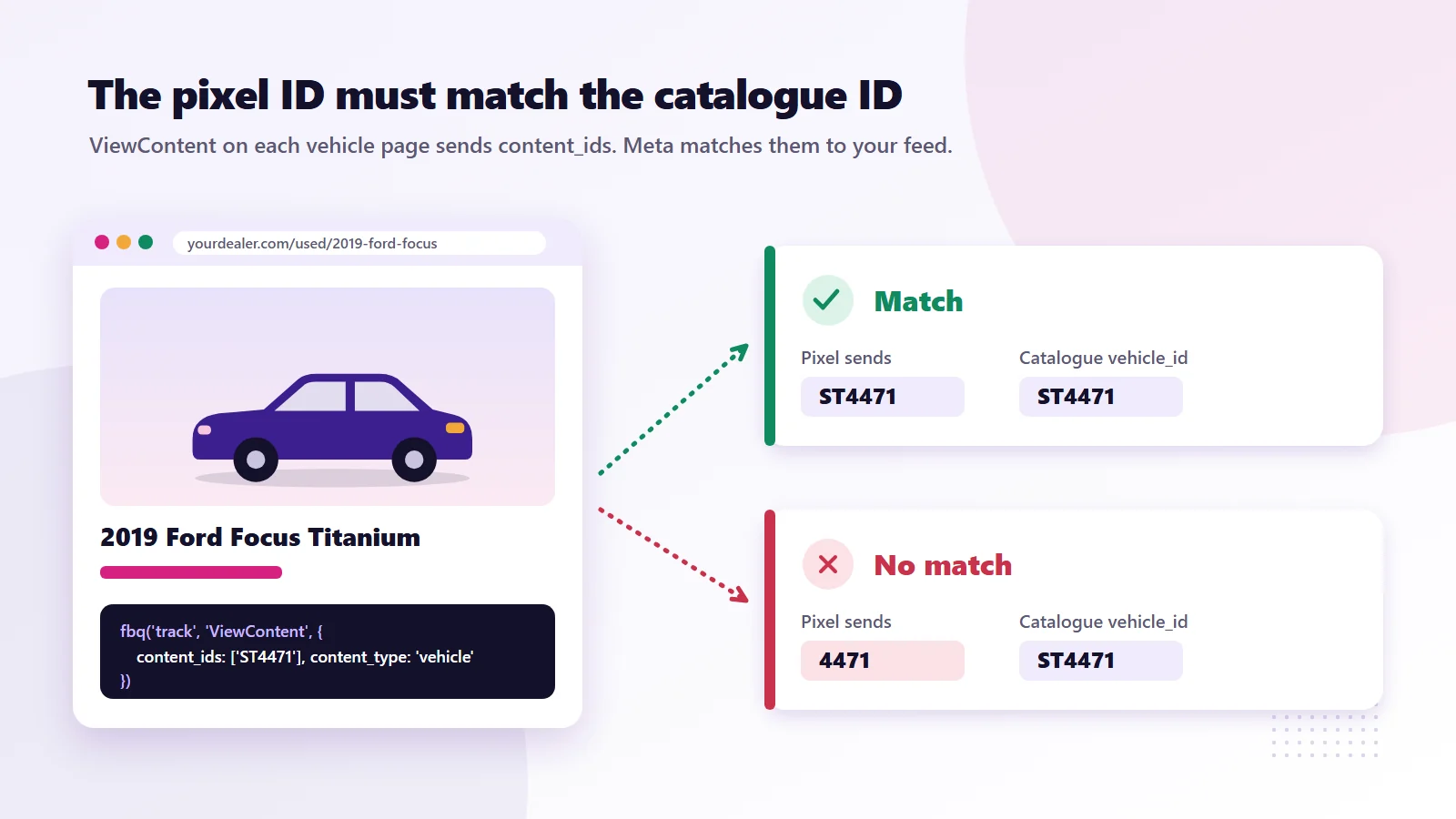
| ViewContent | Each vehicle detail page | content_ids must contain the same ID used in the catalogue |
| Search | Search results and filtered stock pages | Recommended to include the IDs of cars shown |
| AddToWishlist | When someone saves or favourites a car | content_ids required |
Meta also recommends sending content_type set to "vehicle" along with details such as make, model, year, price, currency, mileage, body style and postal code. You will also want a Lead event on enquiry forms, finance applications and click-to-call buttons, so the campaign can learn which shoppers turn into real enquiries.
The single most common fault we see is an ID mismatch. The catalogue says the car is "ST4471" and the pixel sends "4471" or the full VIN. Meta cannot match them, the catalogue match rate in Events Manager stays low, and the ads fall back to guessing. Check the match rate after a few days of traffic. If it is low, compare a pixel event and a catalogue item side by side.
Step 4: Build the campaign
With a working catalogue and pixel, the campaign itself is the easy part. For most independent lots we start with two campaigns.
Campaign one: reach new shoppers nearby
Use a sales or leads objective with your vehicle catalogue attached. Target a radius around the lot that matches how far people actually travel to buy from you. Industry guides commonly put this at roughly 25 to 50 miles, but your own sales history is the better guide. Keep the audience broad inside that radius and let the catalogue do the matching. Over-narrow interest targeting tends to starve these campaigns.
Campaign two: bring back people who viewed a car
Target people who viewed a vehicle detail page in the last 7 to 30 days and did not enquire. This is where inventory ads shine, because the shopper sees the exact car they looked at, or close alternatives if it has sold. Keep this campaign's budget smaller, since the audience is smaller.
Choose formats that suit cars
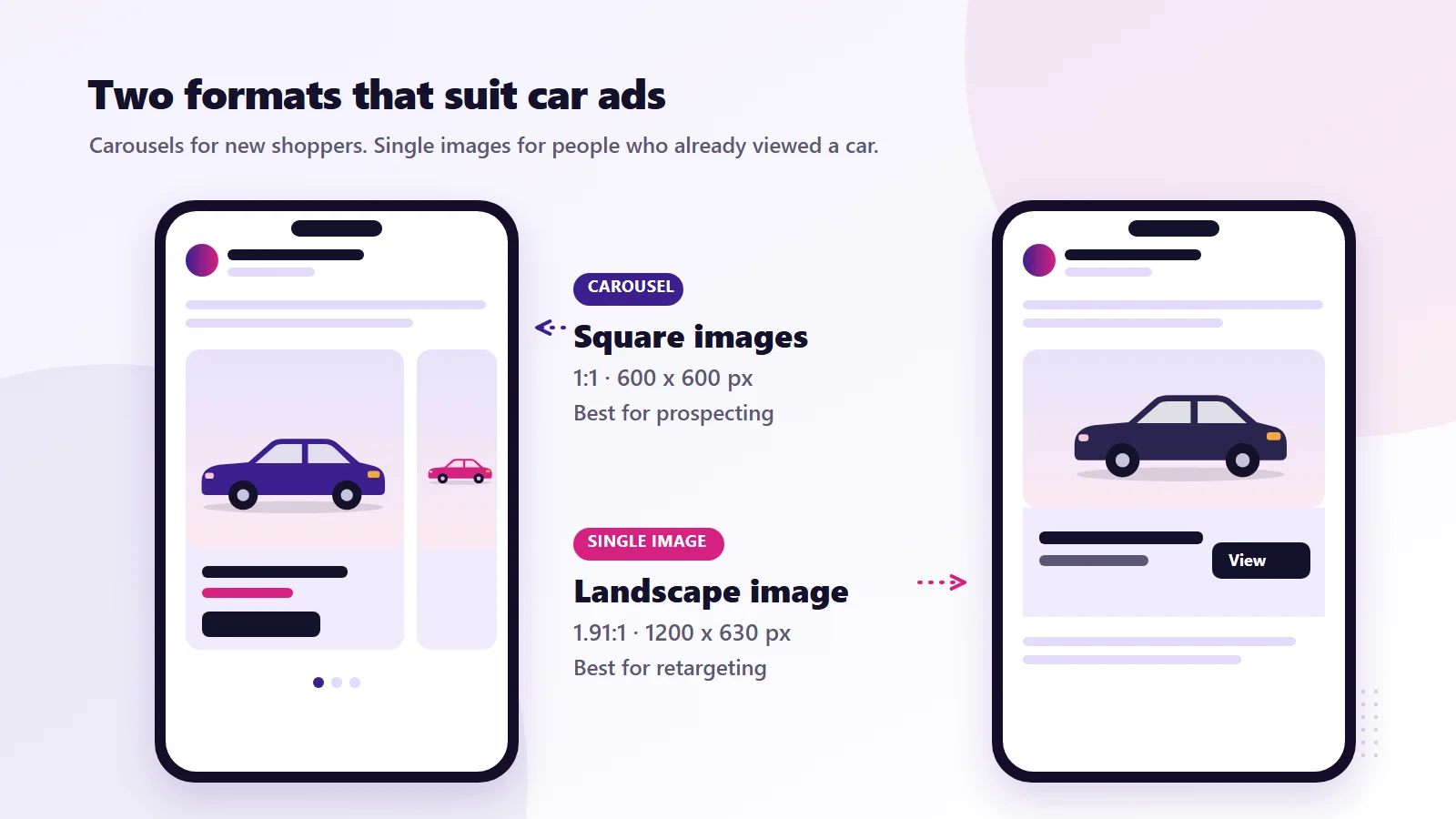
- Carousel shows several vehicles at once and works well for prospecting. Meta recommends square 1:1 images at 600 by 600 pixels for carousels.
- Single image suits retargeting a specific car. The recommended ratio is 1.91:1 at 1200 by 630 pixels.
- Overlays can add the price or mileage onto the image, which helps the ad stand out in a busy feed.
Meta has also introduced product-level video for automotive inventory ads, which turns your listing photos into short video ads per vehicle. It is worth testing once the basics are running smoothly.
Step 5: Know the rules before you mention finance
This is where a lot of dealers get caught out.
In the United States, Meta requires ads about credit and other financial products to run under its Financial Products and Services special ad category. Meta's special ad categories documentation says this has been required since January 2025 for campaigns based in the US or shown to US audiences, and it covers credit offers such as auto loans. Ads in this category have restricted targeting. Age ranges are fixed, all genders must be included and there are minimum location radius rules. If your inventory ad shows monthly payment figures or finance offers, plan for these limits.
In the United Kingdom, advertising car finance brings in the FCA's financial promotion rules, which cover things like representative APR examples. Your finance provider or compliance contact should sign off finance wording before it goes into ads. Separately, the CMA now has direct powers to fine businesses for misleading pricing and fake reviews under the Digital Markets, Competition and Consumers Act (see the CMA's unfair commercial practices guidance), so make sure the prices in your feed match what a customer would actually pay.
The simple route many independents take is to keep inventory ads about the car itself, meaning price, mileage and photos, and handle finance conversations once the buyer has enquired.
Step 6: Measure what actually matters
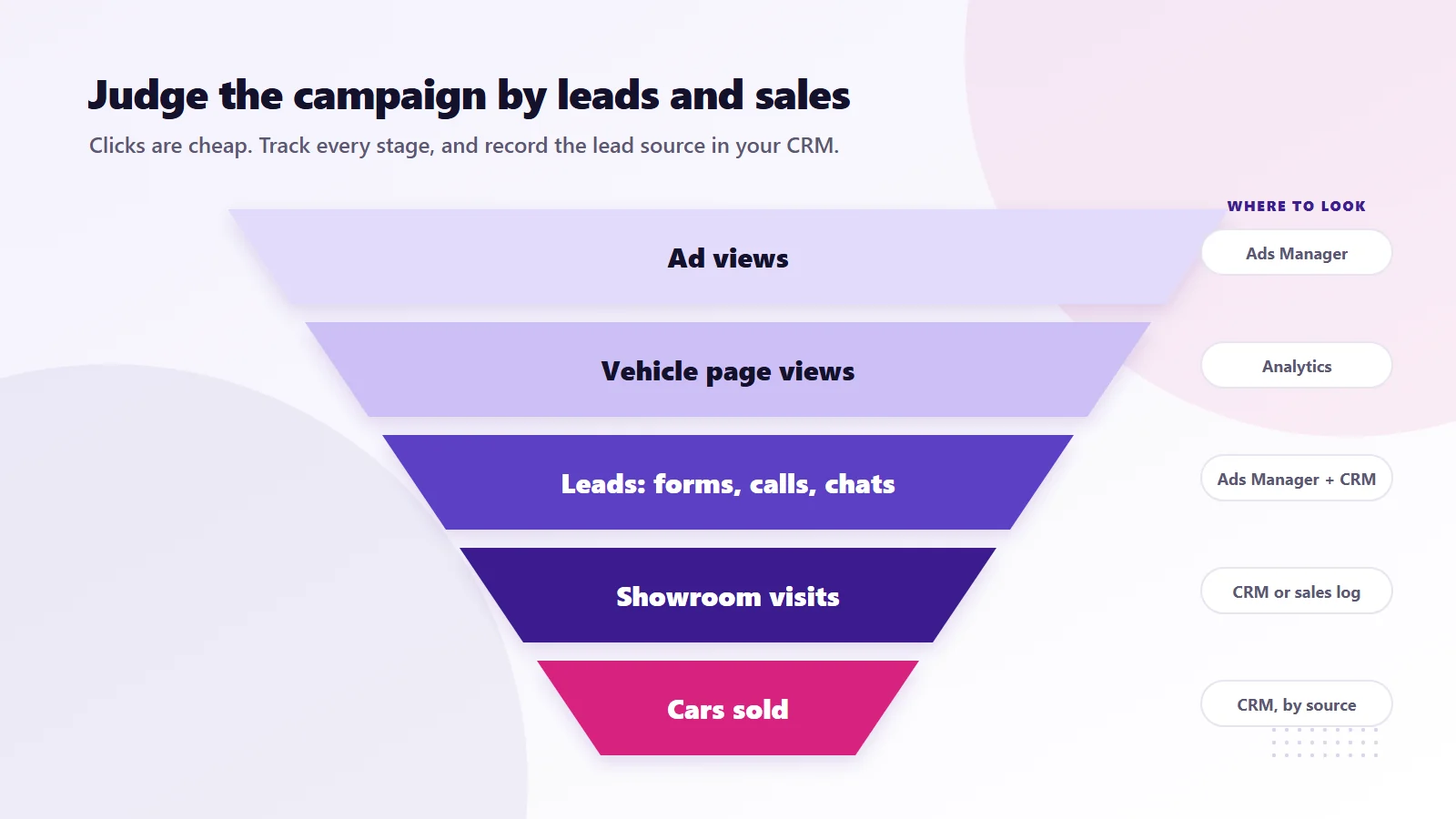
Facebook will happily report clicks and cheap cost per click. Neither pays the bills. Track these instead:
| Metric | Why it matters | Where to find it |
|---|---|---|
| Vehicle page views from ads | Shows the ads are reaching real shoppers | Ads Manager and your web analytics |
| Leads (forms, calls, chats) | The first real sign of buying intent | Ads Manager plus your CRM |
| Cost per lead | Lets you compare against listing sites | Spend divided by leads |
| Lead to appointment rate | Shows lead quality | Your CRM or sales log |
| Cars sold from ad leads | The number that matters most | Your CRM, matched to lead source |
Ask your sales team to record the source of every enquiry. Even a simple column in a spreadsheet makes a huge difference. Without it, you will be comparing Facebook against your listing sites on gut feel.
For context, across the dealership accounts we have worked on, Meta campaigns built on this kind of setup have brought in more than 1,100 leads. Every lot is different, though. Your results will depend on your stock, pricing, location, photos and how quickly your team follows up.
Seven mistakes that waste budget
- Sold cars still in the feed. If the feed only refreshes weekly, shoppers click on cars that are gone. Daily refresh is the minimum.
- Weak first photos. The first image is the ad. A car photographed at an angle in a dark corner of the lot will not get clicked. Shoot the front three-quarter view in good light.
- Linking to the homepage. Every ad should land on that car's own page.
- Pixel and catalogue IDs that do not match. Check the match rate in Events Manager.
- Targeting too narrowly. Tight interest stacks on a small local audience make it hard for Meta to learn. Use radius plus catalogue matching instead.
- Slow follow-up. A lead that waits until tomorrow for a call has often already booked a test drive somewhere else. Set up instant notifications to whoever handles enquiries.
- Judging after three days. Give a new campaign a few weeks and enough budget to gather data before making big changes.
Inventory ads and Facebook Marketplace
Marketplace is a separate surface, and the requirements are stricter. Meta's catalogue reference notes that Marketplace vehicle listings need more than 500 miles or kilometres on the clock and at least two images. Some dealers list on Marketplace through approved partners as well as running inventory ads. The two can work together, but they are set up differently, so do not assume that a working inventory ads catalogue means your cars appear on Marketplace.
Are Facebook ads for used car dealers worth it on a small lot?
If your cars already sit on listing sites like AutoTrader, Cars.com or CarGurus, inventory ads are a way to reach buyers who are not actively searching those sites yet, and to bring back people who looked at your stock and left. The format works best when your stock changes often, your photos are decent and someone answers enquiries quickly.
If you would like a second opinion on your feed, pixel or current Facebook campaigns, you can request a free audit and report using the button below, or see how our team runs Meta Ads for dealerships and other local businesses. Examples of our work are on the portfolio page. If you also sell online, our guide on getting Shopify products recommended by ChatGPT covers the AI search side.
Frequently asked questions
What are Facebook inventory ads for car dealers?
They are Meta's Automotive Inventory Ads. Instead of one fixed creative, Meta builds ads from your vehicle catalogue and shows each shopper the cars from your stock they are most likely to want, with price, mileage and photos pulled from your listings.
Do automotive inventory ads work for used cars?
Yes. Meta's catalogue supports new, used and certified pre-owned vehicles through the state_of_vehicle field, so a lot that only sells used cars can use the format.
What fields does a Meta vehicle feed need?
The main required fields are vehicle_id, title, description, url, make, model, year, mileage value and unit, at least one image, body_style, price with currency, exterior_color, state_of_vehicle and dealer location details such as address, latitude and longitude.
How often should the vehicle feed update?
At least daily. Stock on a used car lot changes quickly, and a weekly feed means shoppers click on cars that have already sold.
Which pixel events do inventory ads need?
Meta's automotive events guide asks for ViewContent on vehicle pages, Search on stock search pages and AddToWishlist when someone saves a car. The content_ids in those events must match the IDs in your catalogue. A Lead event on enquiry forms is also strongly recommended.
Can I show finance offers in Facebook car ads?
You can, but in the US ads about credit, including auto loans, must run under Meta's Financial Products and Services special ad category, which restricts targeting. In the UK, finance wording falls under FCA financial promotion rules, so have it checked before it goes live.
How much should a small dealer spend on inventory ads?
There is no single right number. It depends on your stock, area and competition. Pick a daily budget you are comfortable testing for a few weeks, track cost per lead and cars sold against your listing sites, then decide whether to scale.
Do inventory ads put my cars on Facebook Marketplace?
Not automatically. Marketplace vehicle listings have their own requirements, including more than 500 miles on the clock and at least two images, and are usually handled through approved listing partners.
Have a question about this guide or your own setup? Contact us and our team will get back to you.